NODAR HDK
The NODAR Hammerhead Development Kit (HDK) is a complete hardware and software solution for generating high-quality point clouds from stereo vision cameras.
It is available in two compute variants. The HDK is built around the ruggedized Aetina OnLogic Industrial Orin AGX, and the HDK Nano around the NVIDIA Jetson Orin Nano. Both use the same Hammerhead sensor and run the same software.
The two variants do not perform the same. The Orin AGX in the HDK is roughly twice as fast as the Orin Nano, so expect about half the frame rate on the HDK Nano at the same resolution and settings. Measured numbers for both are on the Benchmarks page.
Getting Started


Congratulations on receiving the Nodar HDK v2.0! The kit contents and the cabling depend on your variant. Follow HDK or HDK Nano below.
HDK
This kit contains:
- (A) HDK Camera
- (B) M12-RJ45 Cat6 cables
- (C) Orin (Aetina OnLogic Industrial Orin AGX)
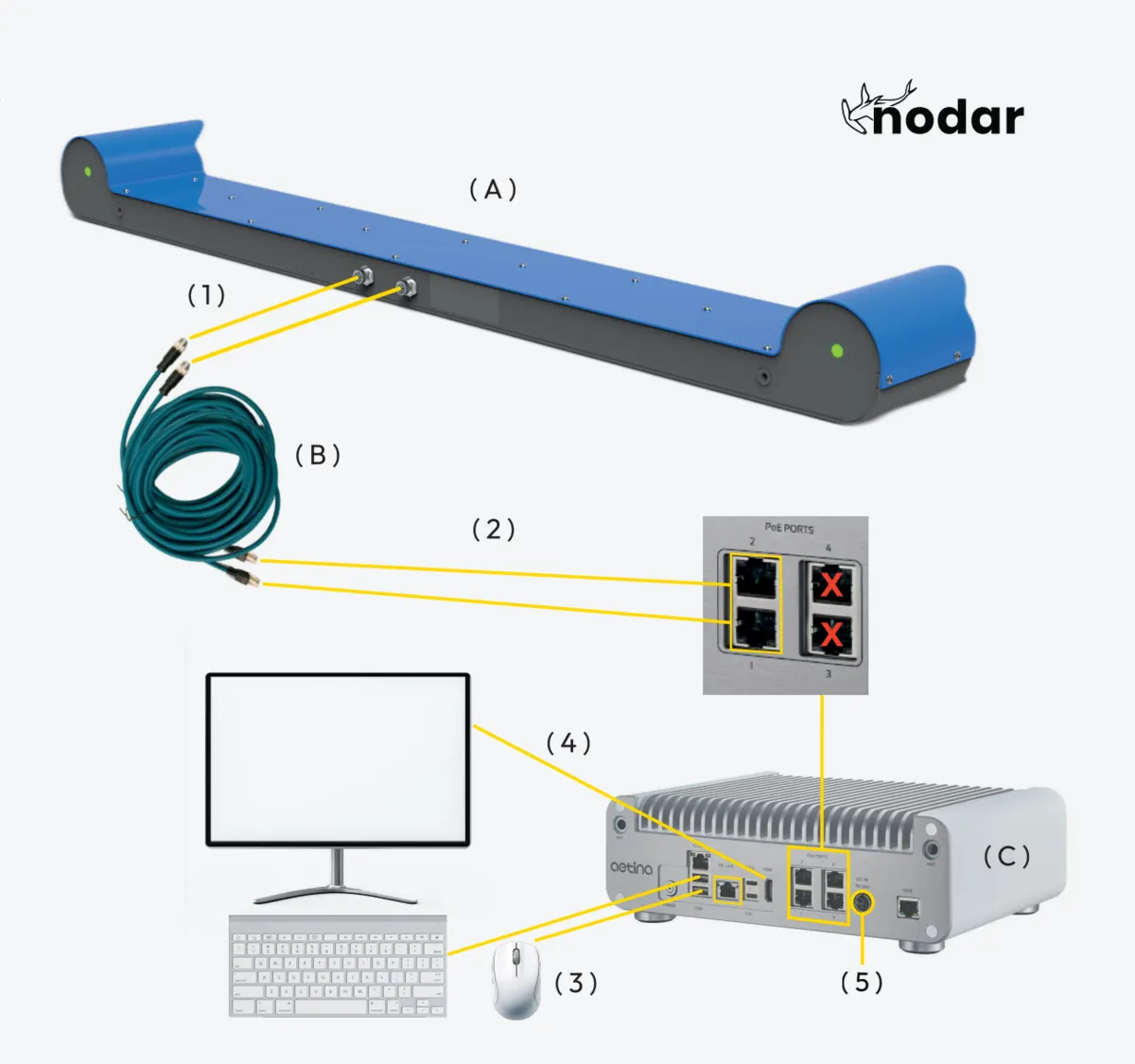
- Connect the M12 end of each cable to the two M12 ports on the HDK camera.
- Connect the RJ45 ends of those cables to PoE Ports 1 and 2 on the Orin.
- Connect keyboard and mouse via USB-A.
- Connect monitor via HDMI.
- Connect power cable to Orin.
- Login with password [Provided by NODAR].
- Launch hammerhead from the terminal. Skip if autostart enabled.
- Launch nodar_viewer from the terminal.
- Click connect on the left side of the Viewer.
- Wait for cameras to initialize (<1 minute).
HDK Nano
The HDK Nano runs at roughly half the frame rate of the HDK. Check the Benchmarks page against your application's requirements before you build around it.
This kit contains:
- (A) HDK Camera
- (B) M12-RJ45 Cat6 cables
- (C) Orin (NVIDIA Jetson Orin Nano)
- (D) 5-port PoE switch, which powers the cameras
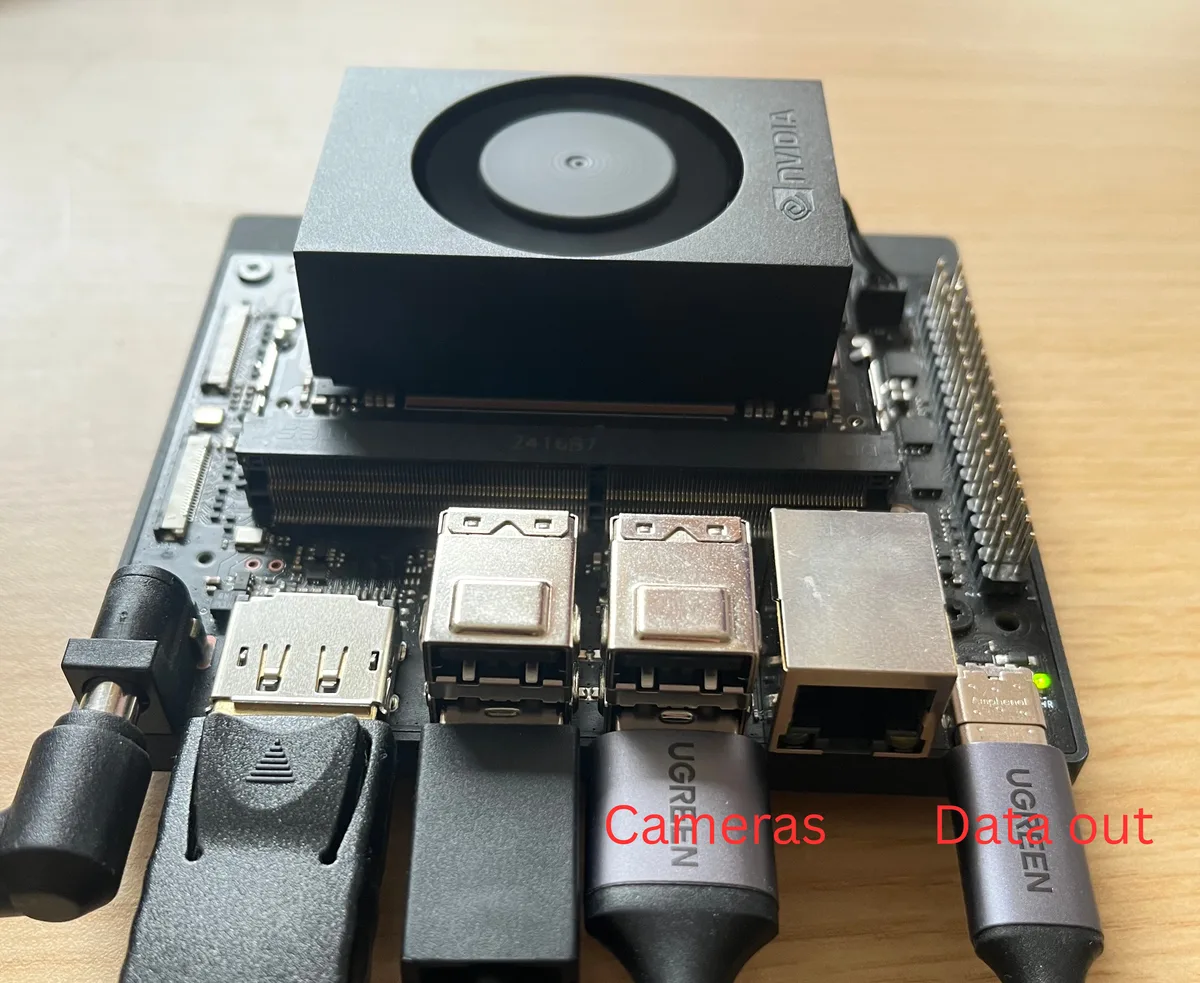
- (E) Two USB Ethernet adapters: a USB-A adapter for the cameras (data-in), and a USB-C adapter for connecting a host computer (data-out)
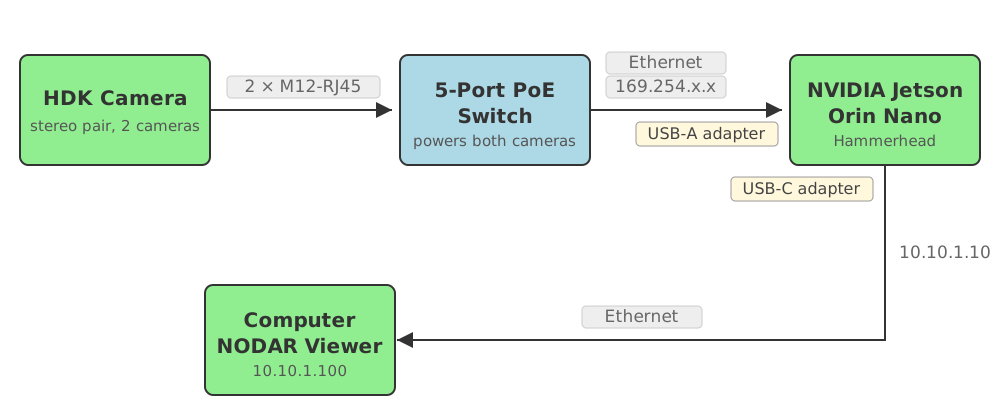
- Connect the M12 end of each cable to the two M12 ports on the HDK camera.
- Connect the RJ45 ends of those cables to the PoE switch, and power the switch.
- Connect the PoE switch to the camera (USB-A) adapter, and plug that adapter into a USB-A port on the Orin.
- Connect keyboard and mouse via USB-A.
- Connect monitor via DisplayPort.
- Connect power cable to Orin.
- Login with password [Provided by NODAR].
- Launch hammerhead from the terminal. Skip if autostart enabled.
- Launch nodar_viewer from the terminal.
- Click connect on the left side of the Viewer.
- Wait for cameras to initialize (<1 minute).
The camera adapter goes in a USB-A port on the Orin Nano and the data-out adapter in the USB-C port:
Running the Viewer on a Separate Computer
On both variants you can run the Viewer on a separate computer instead of on the Orin. See Connecting to a Computer.
Further Reading
- Software Checklist - Things to verify when you receive your HDK
- Manual - Comprehensive documentation for setup, configuration, and operation
- Benchmarks - Measured frame rate and latency for the HDK and HDK Nano
- Legal Notice - Patent and license information