Box Filter
The box filter applies a trapezoidal filter to the point cloud, allowing you to define a 3D region of interest. This is useful for excluding points outside your area of interest.
Parameters
| Parameter | Type | Description |
|---|---|---|
enable_box_filter |
bool | Enables/disables the trapezoidal box filter. Set to 1 to enable, 0 to disable. |
r_max |
float | Maximum radial distance from the camera in meters. Points beyond this distance are excluded. This may override other max parameters if set smaller. |
z_min |
float | Minimum z-coordinate (depth) of the point cloud in meters. Determined by camera FOV, yaw, baseline, and mounting height. |
z_max |
float | Maximum z-coordinate (depth) of the point cloud in meters. |
x_min |
float | Minimum x-coordinate in meters (negative x is to the left of the camera). |
x_max |
float | Maximum x-coordinate in meters. |
y_bottom |
float | Bottom starting point of the box filter in meters. Should be >= y_top. |
y_top |
float | Top starting point of the box filter in meters. Should be <= y_bottom. |
slope_bottom_deg |
float | Slope angle of the filter starting from y_bottom, measured from the z-axis in degrees. Range: -90 to 90. |
slope_top_deg |
float | Slope angle of the filter starting from y_top, measured from the z-axis in degrees. Range: -90 to 90. |
Trapezoidal Shape
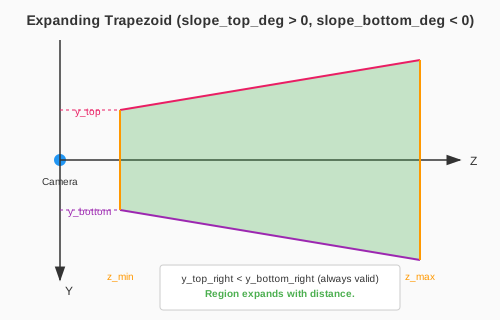
The trapezoidal shape is defined by the y-limits and slope angles. The right side coordinates are calculated as:
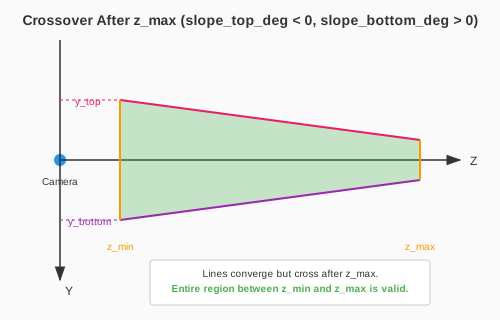
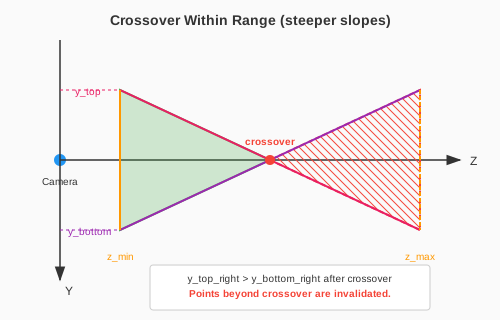
y_top_right = y_top - tan(slope_top_deg * PI/180) * zy_bottom_right = y_bottom - tan(slope_bottom_deg * PI/180) * z
Note that the y-axis points towards the ground.
Examples
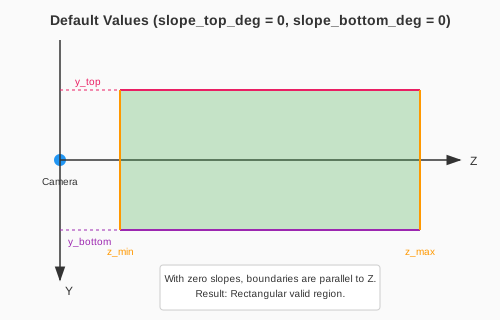
The following diagrams illustrate how different slope values affect the box filter region. When slopes cause the y_top and y_bottom boundaries to cross (crossover), points beyond the crossover are invalidated.